WordPress ActivityPub Plugin: How to Put Your Site on the Fediverse and What to Expect
If your site runs on WordPress, joining the fediverse is a plugin install. The official ActivityPub plugin, maintained by Automattic, turns your site into an account that people on Mastodon, Pixelfed, Misskey and other fediverse apps can follow. Replies come back to your site as ordinary WordPress comments.
This guide covers setup, the settings worth changing and the surprises that catch people out. It's based on the plugin as of November 2026, version 9.4.4, which needs WordPress 6.5 or later and PHP 7.4 or later.
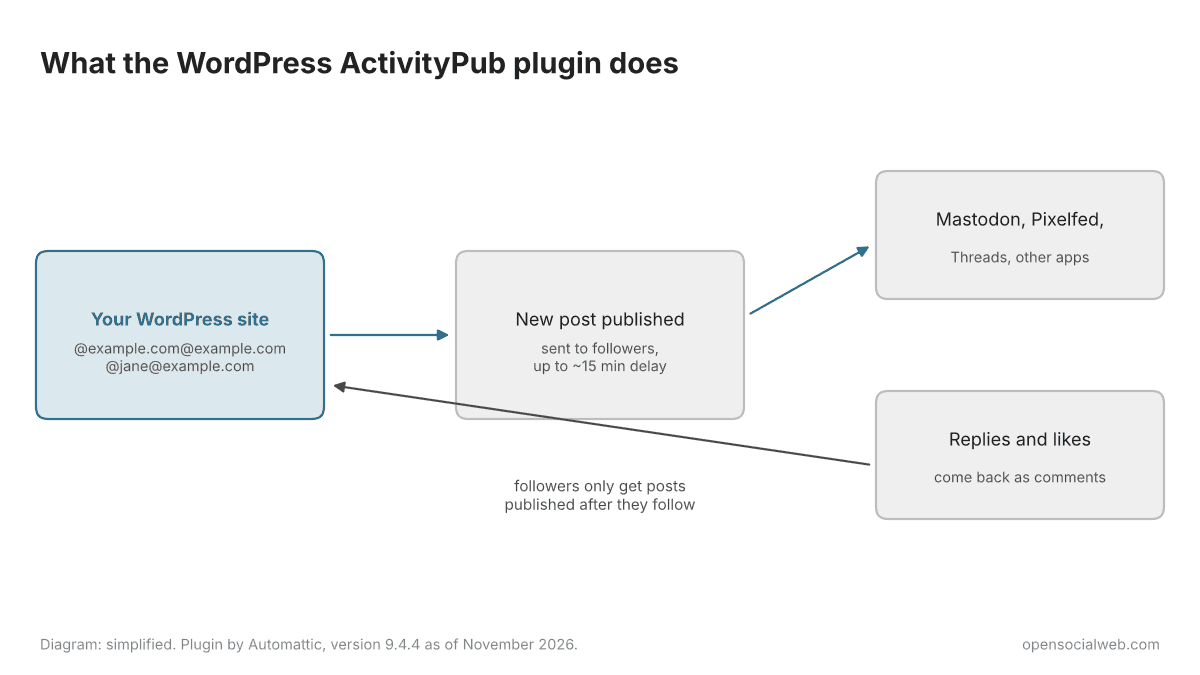
Diagram: Open Social Web, hosted at Pxef.com
What the plugin actually does
It doesn't cross-post to an existing Mastodon account. It makes your site the account. A site at example.com gets a blog-wide profile, @[email protected], and each author can get their own, such as @[email protected]. Someone on Mastodon types that handle into search, hits follow, and from then on your new posts arrive in their timeline.
When they reply, the reply lands in your comments. When you approve it, it's part of the post's discussion like any other comment. Likes and boosts can show up too, through the plugin's blocks.
For the protocol behind this, see ActivityPub Explained for Website Owners.
Setup, step by step
- Install and activate. In the admin, go to Plugins, Add New, search for "ActivityPub", install the one by Automattic and activate it. On WordPress.com the same feature is switched on from the Fediverse option in the dashboard.
- Choose your profiles. In the plugin's settings, pick whether to federate as the blog, as individual authors, or both. For a one-person site, the blog profile is usually enough. For a multi-author site, author profiles let readers follow a writer instead of the whole site.
- Check your permalinks. The blog-wide profile only works with rewrite rules on, which in practice means anything but the "Plain" permalink setting.
- Check your SEO plugin. If Yoast, Rank Math or a similar plugin disables or redirects author archive pages, author profiles break. The fix is to turn author pages back on and mark them noindex instead.
- Fill in the profile. Give the blog profile a name, a short description and an icon. This is what people see before deciding to follow.
- Test it. From a Mastodon account, search for your handle. If the profile shows up, follow it, publish a test post, and wait.
Things that surprise people
Old posts don't appear. Followers only get what you publish after they follow, the way a newsletter works. Your back catalogue stays on your site.
Delivery isn't instant. Posts go out through a scheduled task, so allow up to about 15 minutes before they show up on other servers. On a low-traffic site with unreliable WP-Cron, set up a real server cron job.
Mastodon shows a summary. By default, what federates is cut at the "Read more" tag or a short excerpt, with a link to the full post. That's usually what you want: the click comes back to your site.
Counts look small and patchy. Each fediverse server only knows about the activity that reached it, so your follower list and reply counts are the plugin's view, not a global total.
Some caching and security setups get in the way. Aggressive page caching or firewall rules that block unknown user agents can stop other servers from fetching your profile. If search for your handle fails, check those first.
Settings worth a look
- Post types. Pages usually shouldn't federate. Keep it to posts.
- How much of each post federates. Title plus link, excerpt plus link or the full text. For a publisher, excerpt plus link is the usual pick, since the full article stays one click away on your site.
- Hashtags. The plugin can turn your WordPress tags into hashtags, which is how fediverse users find posts on a topic. Keep tags tidy, as they now face outward.
- Blocks. "Follow me on the Fediverse" puts a follow button on your site. The followers and reactions blocks show social proof under posts.
Is it worth it
For most WordPress publishers, yes. It costs one plugin and a short setup, and it gives you followers tied to your own domain, which no platform can take away. Don't expect a flood. The fediverse is far smaller than the big platforms, leans technical, and rewards steady posting over viral spikes.
If you also want to reach Bluesky, a federated WordPress profile can be bridged there with Bridgy Fed. See Bridgy Fed for Websites, Mastodon and Bluesky. And if your site isn't on WordPress, the same post covers the bridge route for static sites.