Bridgy Fed: Connecting a Website, Mastodon and Bluesky Without Running a Server
The fediverse and Bluesky run on different protocols, ActivityPub and the AT Protocol, and they don't talk to each other natively. Bridgy Fed is the most widely used bridge between them. It also does something less well known that matters more to publishers: it can turn an ordinary website, even a static one, into an account that people on both networks can follow.
Bridgy Fed is run by A New Social, a nonprofit founded by Ryan Barrett, who wrote the bridge, and Anuj Ahooja. It's free and opt-in. Nobody gets bridged unless they ask for it.
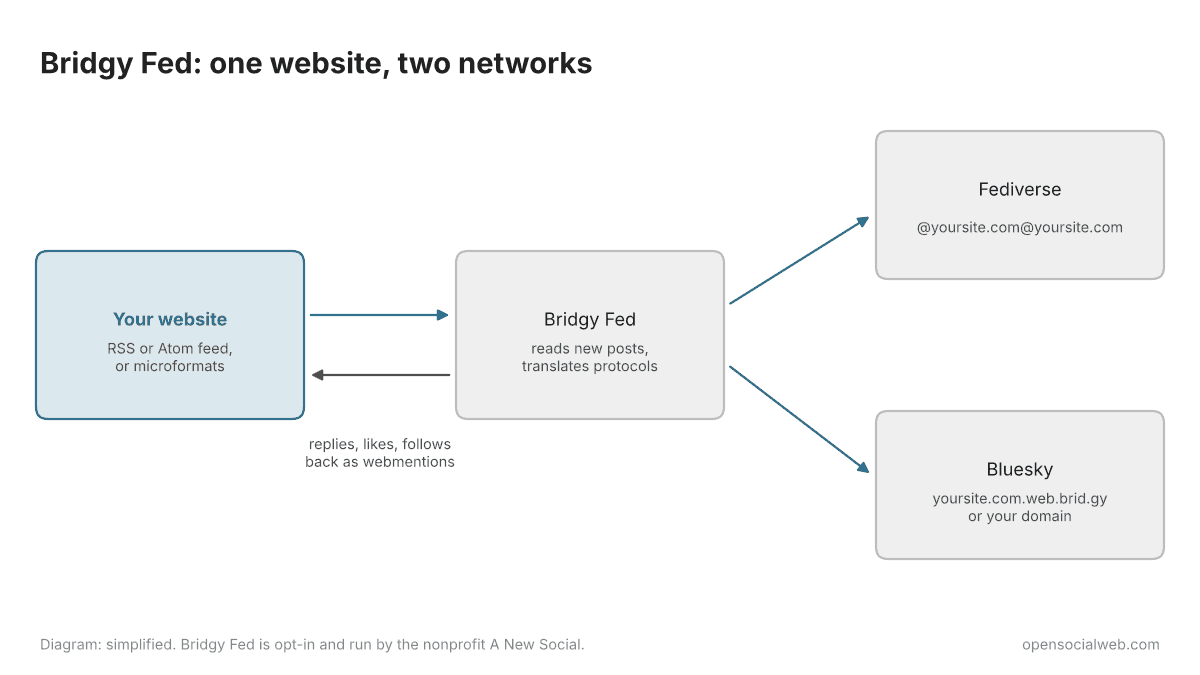
Diagram: Open Social Web, hosted at Pxef.com
Bridging an existing account
If you already have a Mastodon or other fediverse account and want Bluesky users to see it:
- Follow
@[email protected]from your fediverse account. - It follows you back. Your account now has a Bluesky twin.
- On Bluesky your handle looks like
yourname.yourinstance.ap.brid.gy. Bluesky users can follow it, reply and like, and the interactions come back to your fediverse account.
Going the other way, a Bluesky account follows @ap.brid.gy on Bluesky. The fediverse then sees it as @[email protected].
If you use a custom domain on Bluesky, Bridgy Fed can carry it across, and its settings page lets you set a custom domain for a bridged account too.
Bridging a website
This is the useful part for anyone with a site that can't run a fediverse plugin, such as a Hugo blog, a custom Go build or a hand-made HTML site.
Your site needs one of two things:
- an RSS or Atom feed that's linked from the home page, or
- microformats markup (an h-card for you, h-entry for posts) plus support for webmentions.
Most blogs already have the feed, so the feed route is the quick one. Go to fed.brid.gy, enter your domain, and Bridgy Fed creates an account for the site. It checks your feed, picks up new posts and sends them out.
The handles it gives you:
- On the fediverse:
@[email protected]. To make that work on your own domain, your server needs HTTPS and has to redirect two addresses,/.well-known/webfingerand/.well-known/host-meta, to Bridgy Fed. On Cloudflare Pages, Netlify and most hosts that's a couple of redirect rules. - On Bluesky:
yourdomain.com.web.brid.gyby default, which you can switch to your bare domain with a DNS record.
What comes back
Likes, reposts, replies, mentions and follows are sent back to your site as webmentions. If your site doesn't accept webmentions, they still happen on the networks. You just won't see them on your own pages. A static site can use a hosted webmention receiver and pull the results in at build time, or simply ignore them.
Limits to know about
- Bluesky's 300-character cap. Long posts get cut there, with a link to the original. For a blog that's fine: title, a line and the link is what you want people to see anyway.
- Opt-in means smaller reach. People on the other network who haven't bridged can't always interact the way they would with a native account. That's a deliberate choice: an earlier plan to make bridging opt-out met strong pushback from fediverse users, and the project switched to opt-in.
- Threads is a special case. Threads accounts can be bridged once fediverse sharing is on in Threads, except in Europe, where that route isn't available.
- You depend on the bridge. If Bridgy Fed goes down or changes policy, the bridged account goes with it. A WordPress site with the ActivityPub plugin is a first-class fediverse account on its own; only the Bluesky side would need the bridge.
Which route to pick
For a WordPress site, run the ActivityPub plugin and bridge that account to Bluesky. For a static site, bridge the site itself through its feed. For a person who just wants to be on both networks, pick one home account and bridge it.
All three keep your site at the centre, which is the whole idea behind POSSE. For the protocol background, see ActivityPub Explained and Bluesky and the AT Protocol.