The fediverse:creator Meta Tag Puts Your Byline on Every Mastodon Link Preview
Every time someone shares one of your articles on Mastodon, readers see a link preview: title, image, site name. Since July 2024 that preview can carry one more thing, the author's own fediverse account, clickable, right under the article. Readers who liked the piece can follow the writer in one tap, without hunting for a profile.
It takes one line in your page's head. It works no matter who shares the link, which is the point. You don't need to post it yourself. A reader, a fan or a competitor shares your article, and the byline still points to you.
Mastodon introduced the tag as part of a push to make the network friendlier to journalists. It reads a new meta tag named fediverse:creator, much like the Open Graph tags that already decide your preview's title and picture.
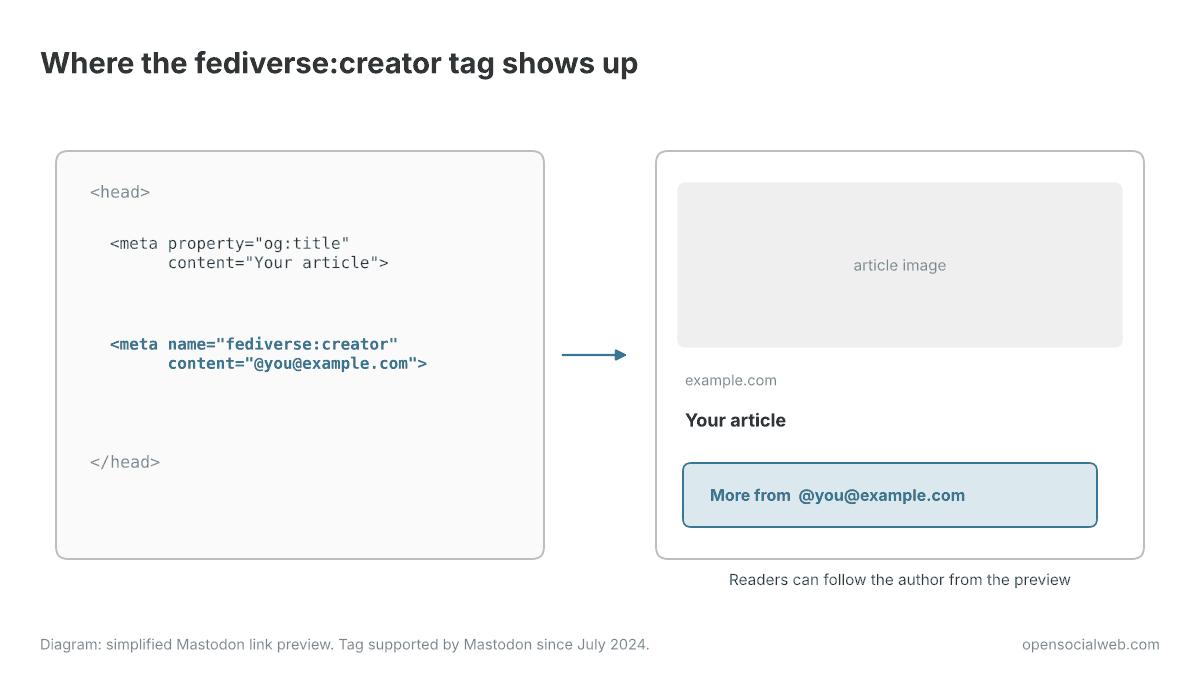
Diagram: Open Social Web, hosted at Pxef.com
The line to add
<meta name="fediverse:creator" content="@[email protected]">
The content is the author's fediverse handle, the same @name@server address people type to find them. It can be a Mastodon account, but it doesn't have to be. Any fediverse account works, including Pixelfed, PeerTube, Flipboard and a WordPress site running the ActivityPub plugin.
Put it on article pages, with the handle of the person who wrote that article. On a single-author blog it can go site-wide. On a multi-author site, each author's handle belongs on their own posts.
Mastodon's side of the deal
There's a catch built in to stop abuse. A Mastodon server won't show the byline just because a page claims an author. The author's profile has to agree. In the profile settings, Mastodon has an author attribution field listing the websites allowed to credit you. Add your domain there. If the site and the profile don't match, the preview shows no byline.
When Mastodon launched the feature, it showed first on mastodon.social. Other servers get it with Mastodon 4.3 or later, so a reader on a server that hasn't upgraded may still see a plain preview.
Adding it without touching templates
WordPress. Small plugins add the field for you, site-wide and per author. The "Simple fediverse:creator" plugin is one. If your theme or another plugin already prints the tag, don't add a second copy.
Static sites and custom builds. It goes in the head template, next to the Open Graph tags. One line per page, filled from the author field. On a single-author site, a fixed line is enough.
Is it worth it
For a site with a recognisable author, yes. It costs a minute and every share on Mastodon becomes a small ad for the writer. For a site with no individual bylines, point it at the site's own fediverse account, for example the blog profile the WordPress ActivityPub plugin creates.
Two related tweaks pair well with it. Verified links with rel="me" give your profile a green check next to your site's address, covered in ActivityPub Explained for Website Owners. A handle on your own domain, covered in Custom Domain Handles on Bluesky and the Fediverse, makes the byline itself point at a name you own.
The tag only does something on fediverse apps that read it. Bluesky, X, LinkedIn and Facebook ignore it. That's fine. Your Open Graph tags keep working for them as before.